
Most people overpay for hotels simply because they check prices once and book. Google Hotels now has a price alert system — free, built right into search — that watches hotel rates for you 24/7 and sends you an email the moment prices drop. This guide shows you exactly how to use it, what most people miss, and how to squeeze maximum savings out of it.

Does Google Hotels Have a Price Alert Feature?
Yes — and it just got a major upgrade in April 2026.
Google Hotels now lets you track prices for individual hotels (not just a whole city), the same way Google Flights alerts work for airfare. You get an email when rates change “significantly” for your exact dates. It’s free, works globally in English and Spanish, and takes about 30 seconds to set up.
You must be signed into a Google Account to use price tracking. That’s the one requirement.
What Is Google Hotels Price Tracking And Why Does It Matter?
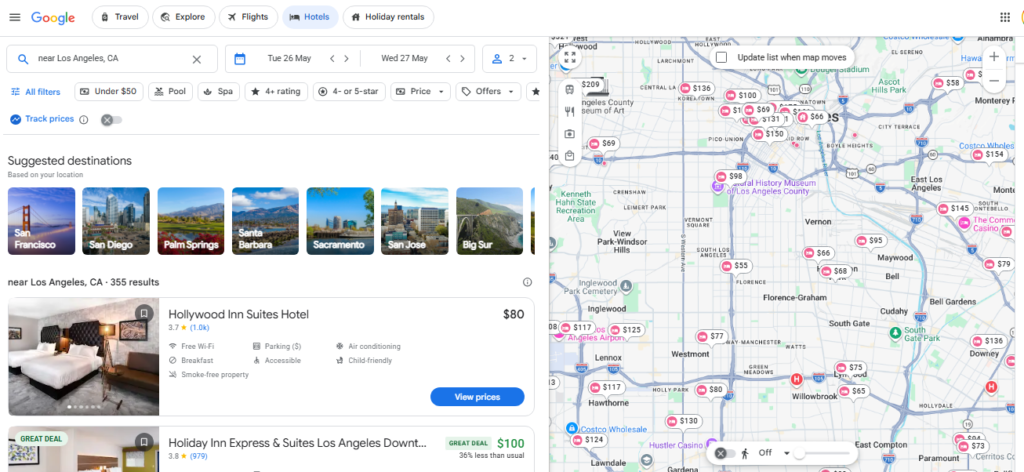
Google Hotels price tracking is a tool that monitors hotel rates on your behalf and alerts you by email when prices go up or down.
Until early 2025, you could only track prices across an entire city — useful for general trends, but not helpful if you had a specific hotel in mind. Google upgraded this in April 2026 to track individual hotel properties worldwide.
Here’s why this matters in real terms:
- Hotel prices change constantly — sometimes multiple times in a single day
- Most people never rebook even when prices drop, because they don’t notice
- If you booked a refundable/flexible rate, a price drop alert is your cue to cancel and rebook at the lower price — automatically saving money you’d otherwise leave on the table
- One travel writer reported rebooking a flight (using the same Google Flights system) for 42% less than the original price — just weeks before travel
The hotel version works identically. The tool is free. There is no reason not to use it.
The Two Ways to Track Hotel Prices on Google – Both Explained
Google Hotels gives you two distinct tracking options. Most people only know one.
| Tracking Type | What It Does | Best For |
|---|---|---|
| Track This Hotel (new – 2026) | Monitors one specific property for your exact dates | You’ve already found your hotel and want to wait for a price drop |
| Track All Hotels | Monitors all hotels in a city matching your filters (star rating, location, amenities) | You’re still deciding which hotel and want to see city-wide trends |
Both send email alerts. Both are free. Both work on desktop and mobile.
Step-by-Step: How to Set a Price Alert on Google Hotels (Desktop)
Setting a price alert on desktop takes under 60 seconds. Here’s exactly what to do:
- Go to google.com/hotels
- Type in your destination city and set your travel dates
- Browse the results and click on the specific hotel you want to track
- On the hotel’s detail page — scroll past the list of booking options
- Look for the “Track this hotel” toggle at the bottom of the listing
- Flip it on — you’ll see a confirmation that Google is now tracking the price
- Done. Google emails you whenever the rate changes significantly for your dates
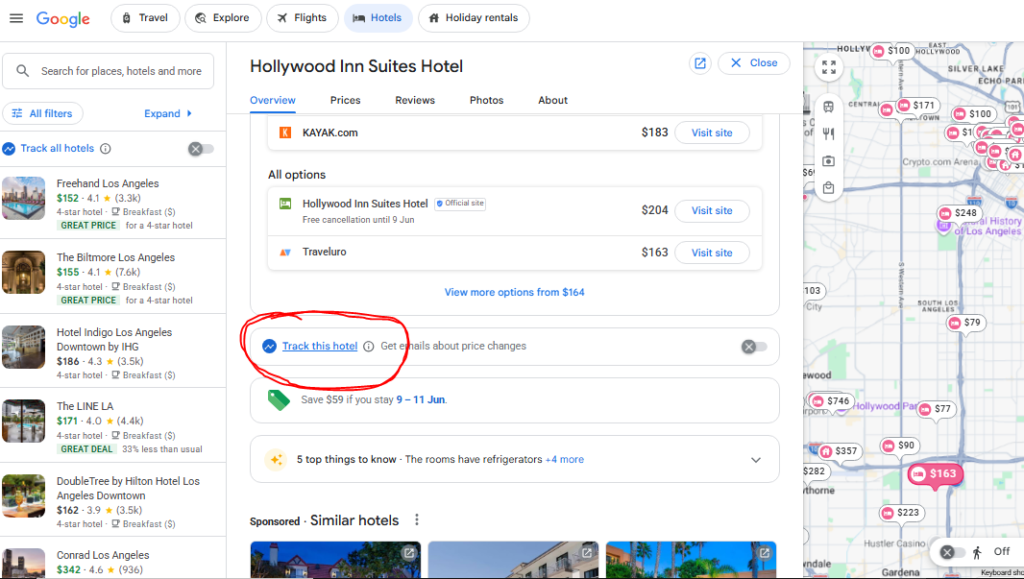
The toggle is easy to miss. It sits below the booking links, not at the top of the page. Most users never scroll far enough to see it.
Step-by-Step: How to Set a Price Alert on Google Hotels (Mobile)
The mobile setup is slightly different — the toggle is in a different location.
- Open Google on your phone and search for the hotel by name
- Tap on the hotel listing
- Tap the “Prices” tab at the top of the hotel page
- Scroll down below the list of booking options
- You’ll see the price tracking toggle — tap to turn it on
- You’re set — alerts go to your Gmail inbox
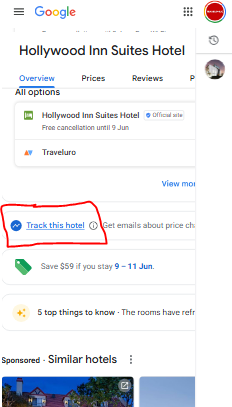
Alternatively on mobile:
- Go to google.com/hotels in your browser
- Search and filter results
- On the overview or prices tab, the tracking toggle appears below booking details
How to Track All Hotels in a City on Google Hotels
Use this if you haven’t picked a specific hotel yet and want to see when prices generally drop in your destination.
- Go to google.com/hotels
- Search for your destination and dates
- Look at the top of the results sidebar on the left
- Click “Track all hotels”
- Set your filters — star rating, price range, specific area on the map, amenities
- Google tracks all matching hotels and alerts you when prices move
Pro tip: Google accounts for your filters when sending alerts. If you set “4-star hotels with pool near the city centre,” you only get alerted on those. You won’t be spammed with irrelevant results.
Also read – 7 Ways to Find Cheap Last-Minute Hotel Deals Near FIFA Venues
The Complete Google Hotels Price Alert Cheat Sheet
| Question | Answer |
|---|---|
| Is it free? | Yes, completely free |
| Do I need an account? | Yes — must be signed into a Google Account |
| What devices does it work on? | Desktop browsers and mobile browsers |
| Is there an app? | No dedicated app — works through Google Search and google.com/hotels |
| What languages? | Currently English and Spanish — global rollout in progress |
| Can I track multiple hotels? | Yes — track as many hotels as you want simultaneously |
| How do I get alerts? | Via email (Gmail preferred) |
| When does it alert me? | When prices change “significantly” — not for tiny fluctuations |
| Does it track OTA prices too? | Yes — pulls from hotel direct sites AND third-party platforms (Booking.com, Expedia etc.) |
| Can I filter which sources it tracks? | No — currently tracks all sources together |
| Works for hostels too? | Yes — works for all accommodation types including budget hostels |
| How do I manage tracked hotels? | Via your Google Account settings |
| Works outside the US? | Yes — available globally as of April 2026 |
| Can I track award/points prices? | Indirectly — cash price drops often mirror points price drops (especially Marriott, Hilton, IHG) |
What Happens After You Get a Price Drop Alert — The Smart Move Most People Miss
Getting the alert is only Step 1. Here’s what to actually do when the email arrives.
Most people read the alert and think about it. The travellers who save real money do this instead:
If You Haven’t Booked Yet:
- Check whether the drop is across multiple booking platforms (not just one OTA)
- If it is — that’s a strong signal it’s a real drop, not a single-platform quirk
- Book the hotel directly when possible — you protect your loyalty points and status benefits
- If the direct rate is higher, call the hotel and ask them to match the lower rate you’re seeing
If You’ve Already Booked a Flexible Rate:
- Cancel your existing booking (confirm the cancellation policy first — free cancellation means no penalty)
- Rebook immediately at the lower rate
- Savings go straight back in your pocket
If You Booked at a Non-Refundable Rate:
- Check whether the hotel has a Best Price Guarantee policy
- Marriott Bonvoy, World of Hyatt, Hilton Honors — all have best rate guarantee claims
- If the rate drops, file a claim through the hotel’s program — many will refund the difference as a credit or cash
Real example: A traveller booked a Marriott for 3 nights at $160/night. Google Hotels sent a price drop alert 11 days before check-in. The rate had dropped to $119. They cancelled (free cancellation), rebooked, and saved $123. Total time: 4 minutes.
5 Expert Tricks to Get More Out of Google Hotels Price Alerts
These are the moves most travellers completely skip:
1. Track the Same Hotel Under Different Date Combinations
Shifting check-in by one day can change the price by 20–30%. Set alerts for the same hotel across 3–4 different date windows to find the sweet spot.
2. Use Price Alerts Even After Booking
Set the alert on the hotel you’ve already booked at a flexible rate. If prices drop — you rebook. If they don’t — you proceed normally. Zero downside.
3. Watch for Points Pricing Drops Too
Marriott, Hilton, and IHG all use dynamic pricing — meaning cash price and points price often move together. When you get a cash price drop alert, immediately check the points rate. It may have dropped too, letting you save points on an award booking.
4. Use the “Track All Hotels” for Big Event Dates
Tracking individual hotels is perfect for normal trips. But for events like concerts, sports finals, or holidays — use “Track All Hotels” across the city and watch the broader trend. When prices start dipping city-wide, that’s your window.
5. Combine Google Alerts With the Calendar View
Before you set the alert, use Google Hotels’ price calendar (visible when you select dates) to identify which nights are already cheapest in green. Set your alert for those dates and watch them get even cheaper as departure approaches.
When Do Hotel Prices Actually Drop? (So You Know When to Expect Alerts)
Price drops don’t happen randomly. Here are the most common windows when Google Hotels alerts tend to fire:
| Timing | Why Prices Drop |
|---|---|
| 21–30 days before check-in | Group booking blocks expire; hotels release unsold rooms |
| 72 hours before arrival | Last-minute inventory dumps — hotels would rather fill at $99 than sit at $180 |
| 24 hours before arrival | Maximum last-minute discount window |
| Sunday check-ins | Typically 15–19% cheaper than Friday arrivals in major cities |
| Midweek (Mon–Wed) | Lower demand in business travel cities |
| After a major event ends | Cities hosting sports tournaments, concerts see sharp drops once the event passes |
| Off-peak season | Early November, late January — revenue managers aggressively cut rates |
Sunday check-in stat: Switching your arrival from Friday to Sunday in a major city can cut your nightly rate by an average of 19%, based on 2026 travel pricing data.
Google Hotels vs. Other Price Alert Tools – Which Is Best?
Google Hotels is the easiest and most free option. But it’s not the only one.
| Tool | Best For | Cost | Alerts Type |
|---|---|---|---|
| Google Hotels | Specific hotel + city-wide tracking | Free | |
| Kayak Price Alert | Broader destination tracking with “book now or wait” forecast | Free | Email + push |
| Hopper | AI-powered prediction on whether prices will rise or fall | Free | App push notifications |
| Trivago | Cross-platform price comparison with date flexibility view | Free | |
| Booking.com Alerts | Booking.com-specific rate drops | Free | Email + app |
| Google Alerts (manual hack) | Setting a text search alert like “hotel price drop Tokyo site:booking.com” | Free |
Bottom line: Use Google Hotels as your primary alert system. Pair it with Kayak’s “price forecast” (which tells you whether to book now or wait) for a complete picture.
The One Thing to Watch Out For With Google Hotels Alerts
Google Hotels pulls prices from both hotel direct sites AND third-party booking platforms like Booking.com and Expedia.
This means:
- An alert might show you a cheaper rate on an OTA, not the hotel directly
- Booking through a third party means you don’t earn hotel loyalty points or status credit
- If something goes wrong (cancellation, room issues), you deal with the OTA — not the hotel
The smart approach: Use the Google Hotels alert to confirm a price has genuinely dropped across multiple platforms. Then call or book the hotel directly at the new rate. Many hotels will match what you’re seeing online.
Quick Setup Checklist Before Your Next Trip
Follow this every single time you plan a stay:
- Sign into your Google Account
- Go to google.com/hotels
- Search your destination and dates
- Check the price calendar — note which nights are cheapest (shown in green)
- Click your preferred hotel → scroll past booking options → toggle “Track this hotel”
- Also toggle “Track all hotels” in the sidebar for city-wide awareness
- Book a flexible/free cancellation rate so you can rebook if prices drop
- When an alert arrives — check the Best Price Guarantee policy before rebooking
Frequently Asked Questions
Does Google Hotels price tracking work on the Google app?
It works through Google Search and the mobile browser at google.com/hotels. You don’t need a separate app — just a signed-in Google Account.
How “significant” does a price change need to be to trigger an alert?
Google doesn’t publish the exact threshold, but minor fluctuations (under ~2%) are filtered out. You get alerted for meaningful drops — typically $10+ per night on mid-range hotels.
Can I use Google Hotels price alerts for Airbnb or vacation rentals?
Google Hotels shows vacation rental results alongside hotels. The price tracking feature covers these listings too.
Does the price tracking work for hotels that are fully booked?
No — Google Hotels only tracks available rooms. For fully-booked properties, a separate tool like OpenHotelAlert (which monitors Booking.com availability) can alert you when a room opens up.
I turned on tracking but didn’t get an email. What happened?
Prices may not have changed significantly enough to trigger an alert, or you may not be signed in. Check your Google Account settings to confirm tracking is active.
Final Word: Set It and Stop Checking
The single most exhausting part of planning a trip is obsessively refreshing hotel pages hoping prices drop. Google Hotels price tracking makes that entirely unnecessary.
Set the alert in 30 seconds. Book a flexible rate. Then ignore it until Google emails you.
That’s the whole strategy. Free tool, zero effort after setup, and real money back in your pocket when prices shift.
Go to google.com/hotels right now and set your first alert before you forget.

