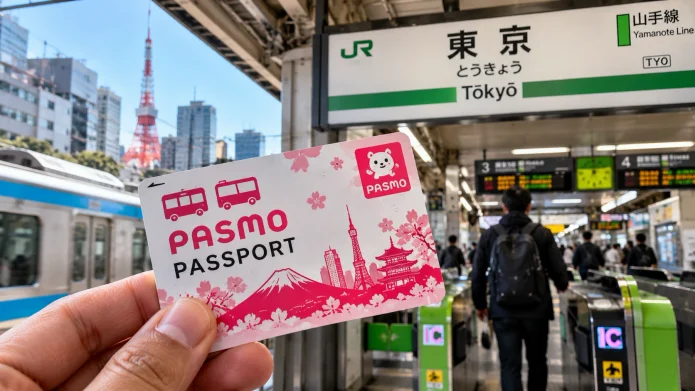
The Pasmo Passport is a special electronic IC card designed specifically for short-term tourists visiting Japan, offering a deposit-free way to pay for trains, buses, and shopping. Unlike the standard Pasmo card, which requires a 500-yen refundable deposit, the Passport version is free to issue but expires after 28 days. This card removes the friction of navigating complex ticket machines at every single station, allowing visitors to simply tap and enter.
What is the Tokyo Pasmo Passport and Why Use It?
The Pasmo Passport is a short-term transit card that simplifies travel across Tokyo and other major Japanese cities. It functions as a digital wallet for your commute, meaning you don’t have to calculate fares or buy individual paper tickets for every trip. Because it works on almost all trains, subways, and buses in Japan, it is the most efficient tool for anyone who doesn’t want to spend their vacation staring at a confusing fare map.
Travelers often find that using a physical IC card is faster than trying to figure out the exact ticket price for a trip from Shinjuku to Shibuya. Beyond transport, the card is accepted at thousands of convenience stores (konbini), vending machines, and some restaurants. This eliminates the need to carry small coins for every drink or snack purchase throughout the city.
Where and How to Buy a Pasmo Passport in Tokyo
You can purchase a Pasmo Passport at major airports (Narita and Haneda) and specific designated stations within Tokyo. The most convenient method is to find the Pasmo sales counters or specialized ticket machines located in the arrival halls of the airport. Visitors must present a valid passport to prove their tourist status, as this card is strictly reserved for non-residents.
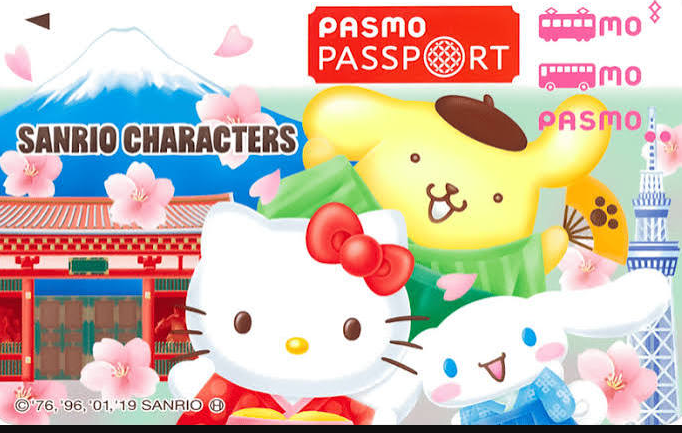
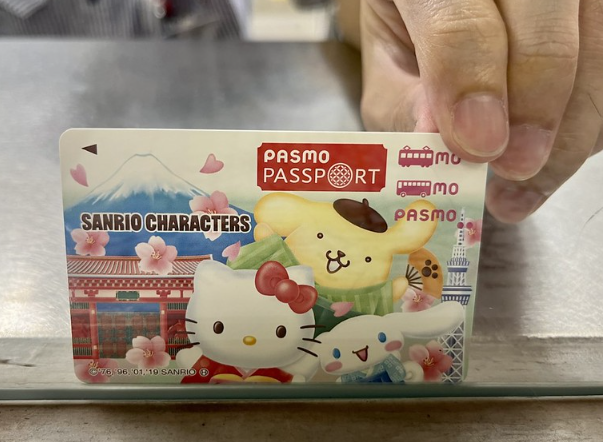
When buying the card, you will be asked to choose an initial charge amount. It is recommended to start with 2,000 to 5,000 yen depending on your planned itinerary for the first few days. The staff will hand you the card, which often features unique, colorful designs specifically for tourists, making it easily distinguishable from the plain green standard Pasmo cards. For official availability and current locations, check the Official Pasmo Website.
Also read – Japan’s 2026 Tourist Tax Has a Hidden $45 Catch Nobody …
How to Use the Pasmo Passport for Transport and Shopping
Using the card requires a simple tap-and-go motion at the ticket gates of any compatible station. You touch the card against the blue luminous reader at the entrance gate and again at the exit gate. The system automatically calculates the fare and deducts the exact amount from your balance. If you hear a loud beeping sound and the gate doesn’t open, it usually means your balance is too low.
For buses, the process varies by city. In Tokyo, you generally tap the card upon entering the bus and tap again when exiting. In some other regions, you only tap when getting off. When using the card for shopping at a 7-Eleven or Lawson, simply tell the cashier “Pasmo” and tap the reader during checkout. For more general travel guidelines, the Japan National Tourism Organization (JNTO) provides comprehensive visitor resources.
Pasmo Passport vs. Standard Pasmo vs. Mobile IC Cards
Choosing the right card depends on whether you prefer a physical keepsake or the convenience of a smartphone. The Pasmo Passport is best for those who want a physical card without the hassle of a deposit. However, the Mobile Suica or Mobile Pasmo options are often superior for tech-savvy travelers as they can be topped up instantly via Apple Pay or Google Pay without visiting a machine.
| Feature | Pasmo Passport | Standard Pasmo | Mobile Suica/Pasmo |
|---|---|---|---|
| Deposit Required | No | Yes (500 Yen) | No |
| Validity | 28 Days | Permanent | Permanent |
| Purchase Req. | Passport Required | None | Smartphone/App |
| Physical Card | Yes (Tourist Design) | Yes | No (Digital) |
| Top-up Method | Station Machines | Station Machines | Digital Wallet |
15 Essential Tips for First-Timers Using the Pasmo Passport
1. Check your balance at the gate. The small screen on the ticket gate shows your remaining balance every time you tap out; check this to avoid being stranded at a gate.
2. Use the “English” button on top-up machines. Almost every ticket machine has an English toggle in the top right corner, making it easy to add funds without knowing Japanese.
3. Carry a backup 1,000 yen bill. Some older top-up machines only accept cash in denominations of 1,000 yen, so avoid trying to use 5,000 or 10,000 yen notes.
4. Don’t lose the card. There is no “forgotten password” or account recovery for physical IC cards; if you lose the Pasmo Passport, the money on it is gone.
5. Use it for “Ekiben” (Station Bento). Most station kiosks accept Pasmo, allowing you to grab a quick meal for the Shinkansen without digging for change.
6. Avoid using it for long-distance Shinkansen. The Pasmo Passport is for local transit. For the Bullet Train, you still need a separate ticket or a specific JR Pass integration.
7. Tap the same reader. Always use the same card/reader for entry and exit; using a different card or a mobile phone for one end of the trip will cause an error at the gate.
8. Keep it in a dedicated card holder. Placing the card in a phone case can sometimes cause “interference” if you have another IC card (like a Suica) in the same slot.
9. Top up before peak hours. Machines at Shinjuku or Shibuya stations often have long lines during morning rush hour (8 AM – 9 AM); add funds the night before.
10. Use it at Gachapon machines. Many of the capsule toy machines in Akihabara now accept IC cards, saving you from hunting for 100-yen coins.
11. Don’t try to refund the card. Since the Pasmo Passport has no deposit, there is no money to “get back” at the end of your trip.
12. Pair it with a Google Maps route. Google Maps tells you exactly which station to use and if the transit is compatible with IC cards.
13. Be aware of the 28-day limit. The card becomes a plastic scrap exactly 28 days after issuance; plan your trip duration accordingly.
14. Use the card at shrines and temples. Some larger shrines in Tokyo now accept IC cards for amulets or entrance fees.
15. Check for “IC Only” lanes. Some stations have dedicated gates for IC card users that move much faster than the paper ticket lanes.
Common Troubleshooting: What to Do When the Gate Beeps
The most common issue is an insufficient balance, which triggers a red light and a loud beep. If this happens, do not panic; simply step aside to let other passengers pass and look for the nearest “Fare Adjustment” machine (usually located right next to the gates). Insert your card, add the required amount, and tap again.
Another common error is the “Card Clash,” where the reader detects two IC cards at once. This happens if you hold your wallet up to the reader and have multiple transit cards inside. To fix this, remove the Pasmo Passport from your wallet and tap it individually against the sensor. For further assistance with transit laws and rules, refer to the Ministry of Land, Infrastructure, Transport and Tourism (MLIT).
Final Checklist for a Seamless Tokyo Transit Experience
Before leaving the airport, ensure the card is active by tapping it at a convenience store. Keep an eye on your balance throughout the day, especially if you are using the card for shopping. If you are planning a trip to other cities like Osaka or Kyoto, remember that the Pasmo Passport works there too, as IC cards are interoperable across Japan’s major networks. For a full list of compatible regions, visit the Japan Railway (JR) information portal.
Focus Keywords: Tokyo Pasmo Passport, buy Pasmo Passport Tokyo, use Pasmo Passport, Japan transit card for tourists, Pasmo vs Suica for tourists.

