If you’re confused about the Vietnam visa process, you’re not alone. Hundreds of people get their applications rejected or stuck every single month — usually over the same fixable mistakes.
I’ve been living in Vietnam for 6 years. I’ve helped hundreds of people get their visas approved. This guide covers every major problem people face, so you can avoid all of them.
First: Use ONLY the Official Website
The official Vietnam e-visa website is evisa.gov.vn
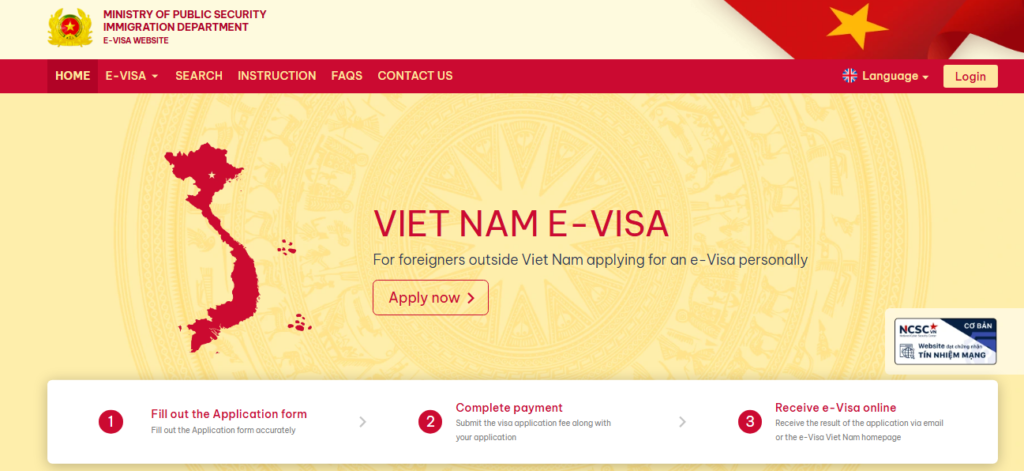
That’s it. If you’re on any other site, you’re either:
- On a scam website, or
- On a third-party service that charges extra just to fill out this same form for you
Go directly to evisa.gov.vn → click Apply Now → confirm and proceed.
The 5 Most Common Reasons Vietnam Visas Get Denied
1. Wrong Photo Upload
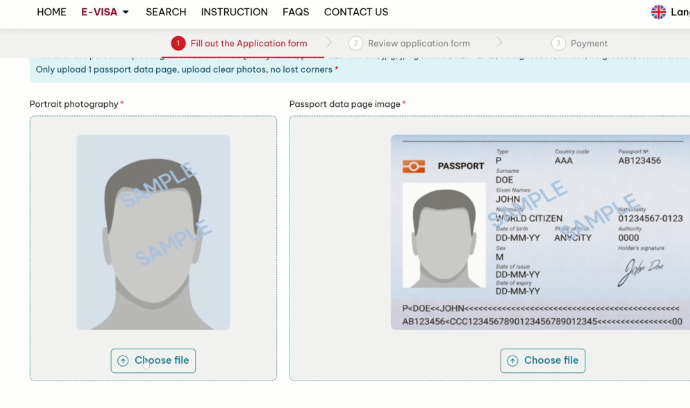
When uploading your headshot, follow these rules strictly:
| Requirement | What to Do |
|---|---|
| Frame | Shoulders and above only |
| Background | White background |
| Glasses | Not allowed |
| Expression | No smiling |
| Match % | Aim above 50% — 64% gets approved fine |
Don’t stress about the match percentage. A lot of people message me panicking about 50–60% match. As long as you’re above 50%, you’re going to be fine. Do your best to make both photos look similar, but don’t overthink it.
2. Names Entered in the Wrong Order
This is one of the biggest mistakes people make and it’s easy to miss.
The form labels the fields as “Middle Name and First Name” — but you should actually enter your First Name first, then Middle Name.
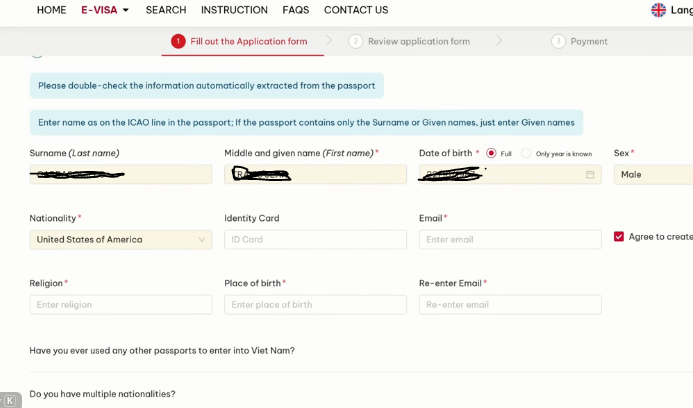
Here’s how to get it right every time:
- Flip your passport to the bottom
- Look at the MRZ line (the line with all the letters and numbers)
- It shows: Last Name → First Name → Middle Name
- Enter your name in that exact order on the form
The auto-fill from your passport photo sometimes gets this wrong too. Always double-check manually.
3. Wrong Date Format
Vietnam’s date format is Day / Month / Year — the opposite of the US format.
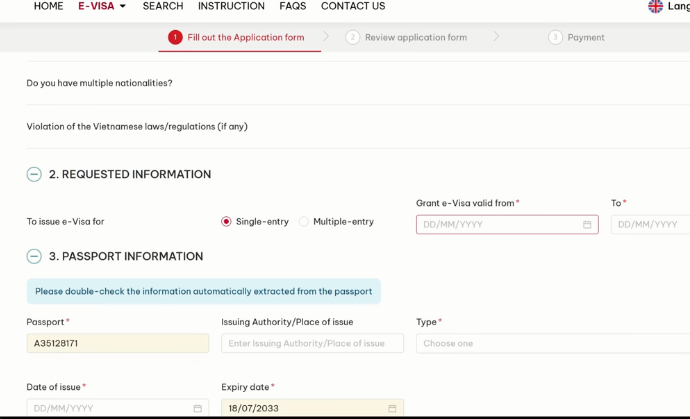
So if you’re entering March 15, 2025, it should be entered as:
15 / 03 / 2025 ✅
03 / 15 / 2025❌
This applies to:
- Your intended entry date
- Your visa validity period (max 90 days)
- Single entry vs. multiple entry selection
Go back and double-check your dates on the review page before hitting submit.
4. No Travel Insurance Listed
Under Section 8 — Trips, Expenses & Insurance, a lot of people leave the insurance field blank or hit “No.”
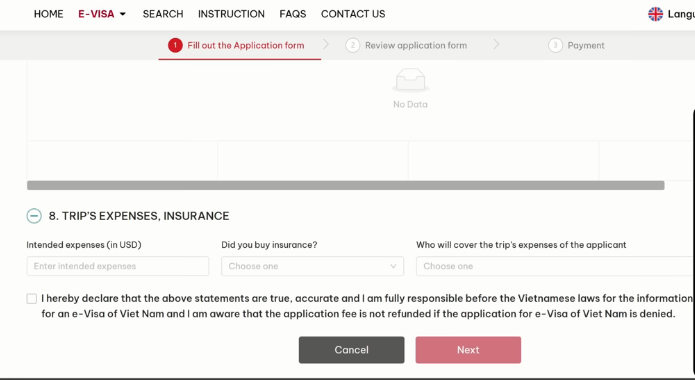
This is one of the main reasons applications come back asking for more information — or get rejected outright.
Here’s what to fill in:
- Intended expenses: Put a few thousand USD
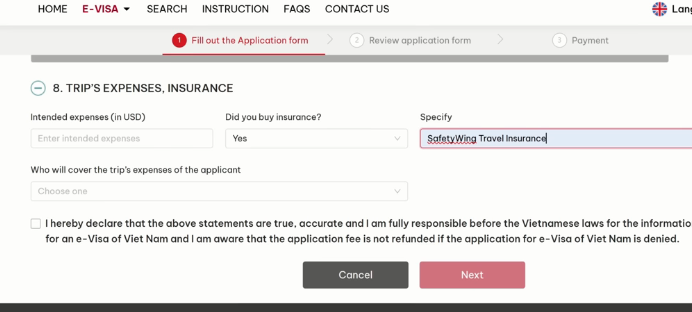
- Did you buy insurance? → Select Yes
- Specify provider: Enter your travel insurance company name
I personally use and recommend Safety Wing for Vietnam travel insurance. You can sign up in minutes, even after your trip has already started. Vietnam is wild — I ended up in a Vietnamese hospital for 4 days once. Now I never travel without it.
⚠️ The Vietnamese government doesn’t want tourists stuck in the country unable to pay hospital bills. Travel insurance isn’t just recommended — it’s expected on this form.
5. Payment Page Problems (The Biggest Headache)
This is where most people get stuck. Here are the three situations and exactly what to do in each:
Situation A: You got a confirmation code but the payment window won’t open
- Go to the Search section on evisa.gov.vn
- Enter your registration number (from the confirmation or email)
- Enter your email + date of birth + security code
- Retrieve your application and try to reach the payment step again
- If it still won’t work — wait a few hours or try the next day
Situation B: You reached payment but your card was declined
- There is nothing you can do with that application — it’s now void
- You must start a brand new application from scratch
- Wait a few hours before trying again
- Switch to Chrome browser if you haven’t (it works best; Brave also works fine)
- Try again with the same or a different card
Situation C: Payment went through but no confirmation — status shows “Unpaid”
- Don’t panic
- Wait 3–4 business days for the system to catch up
- The payment usually registers on its own during the processing window
- Check your email for any update
In almost every case, payment issues are a problem with the government website, not your bank or card. It’s a known issue. Be patient and persistent.
Pro Tips Before You Apply
- Apply as early as possible — give yourself buffer time for technical issues
- Double-check names and dates on the review page before paying
- Get travel insurance before you apply (Safety Wing is quick to set up)
- Use Chrome or Brave browser for the smoothest experience
- Save your registration number and confirmation email immediately
Quick Recap Before You Apply
| What to Check | What to Do |
|---|---|
| Name order | First name → Middle name (not the other way) |
| Date format | Day / Month / Year |
| Photo | White background, no glasses, no smile |
| Travel insurance | Select Yes, enter provider name |
| Payment failed? | Start over, wait a few hours, use Chrome |
| Payment went through, no confirm? | Wait 3–4 days, it’ll update |
Need Help Fast?
If you have a flight in a few days and the visa still isn’t sorted, don’t wait it out alone. I can connect you with a trusted agent in Vietnam who handles these cases regularly — and because I send him a lot of customers, he offers the best prices around.
Send me an email – contact info is in the comments – and I’ll get you sorted.
Also read – The 2026 Visa-Free Country List for US Passport Holders …

