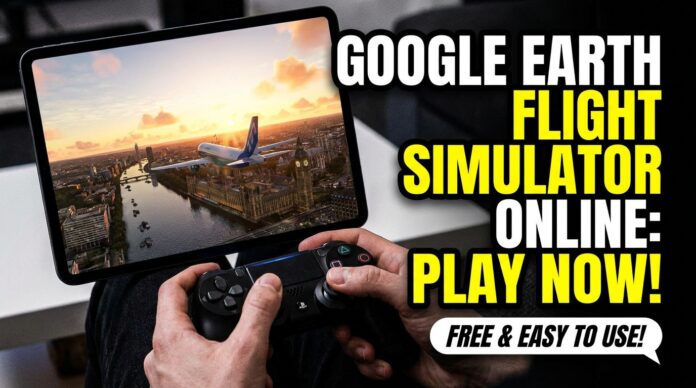
Google Earth Flight Simulator is now available online for free, and you can use it directly in a web browser without installing Google Earth Pro. Open Google Earth, click Explore Earth, open the Tools menu, and select Flight Simulator. That is the fastest way to start flying over real-world locations using Google Earth’s satellite imagery and 3D map data.
This is not a professional pilot training tool. Google describes it as an experimental feature made for casual exploration, which means it is better for fun, learning geography, and seeing cities from above than for realistic flight practice.
How to Use Google Earth Flight Simulator Online for Free
To launch Google Earth Flight Simulator online, use Google Earth on a computer browser. It works on the web version, so you do not need to download extra software.
Follow these steps:
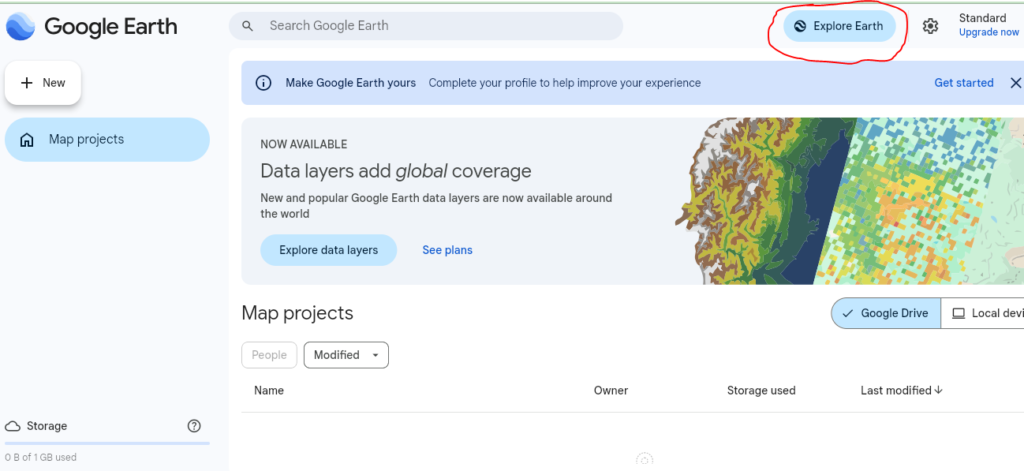
- Go to Google Earth
- Click Explore Earth
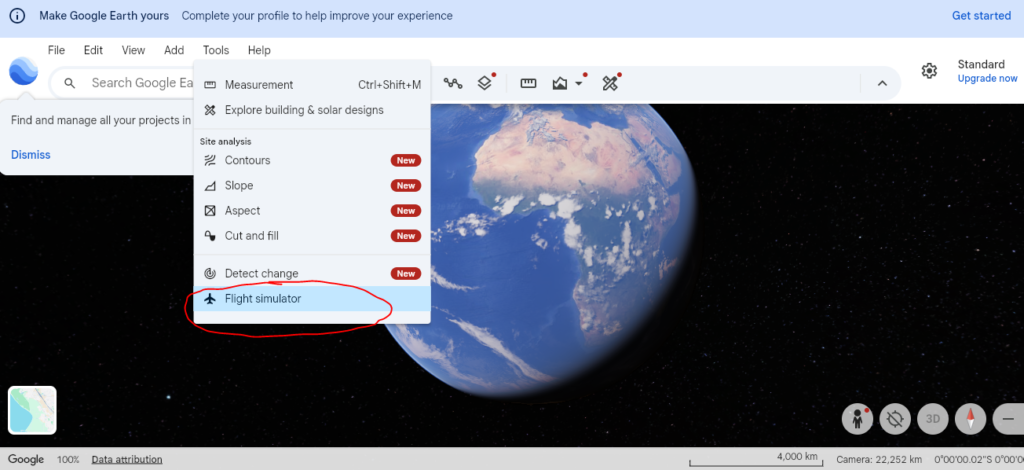
- Open the Tools menu at the top
- Select Flight Simulator
- Start flying with your keyboard or mouse
A small tip from actual use: before you start, search for a city, mountain range, coastline, or landmark you really want to see. If you begin from a random map view, you may end up flying over a plain area or open water, which feels less exciting.
Best Settings Before Your First Flight
Switch the basemap from Map to Satellite before flying. Google notes that the simulator may open with the abstract map view by default, but Satellite view gives you the better visual experience.
Use this setup for a smoother first flight:
| Setting | Best Choice | Why It Helps |
|---|---|---|
| Basemap | Satellite | Shows more realistic imagery |
| Start area | Familiar city or landmark | Easier to enjoy and navigate |
| Controls | Keyboard first | Simpler for beginners |
| Speed | Slow and steady | Reduces crashes |
| Internet | Stable connection | 3D buildings and imagery load while flying |
Also read – How to Filter Out Basic Economy on Google Flights Easily?
Google Earth Flight Simulator Controls for Beginners
The main controls are simple, but small movements work best. Do not hold every key too long. That is the fastest way to flip, dive, or crash.
| Action | Keyboard Control |
| Increase thrust | Page Up |
| Decrease thrust | Page Down |
| Pitch up / climb | Up Arrow |
| Pitch down / dive | Down Arrow |
| Roll left | Left Arrow |
| Roll right | Right Arrow |
| Toggle mouse controls | Click inside the simulator |
One beginner mistake is pressing the arrow keys like a racing game. Flight control is slower. Tap, wait, and correct gently.
Can You Still Use Google Earth Pro Flight Simulator?
Yes, Google Earth Pro still has the classic desktop Flight Simulator. In the desktop app, open Tools > Enter Flight Simulator. You can also use shortcuts:
- Windows: Ctrl + Alt + A
- Mac: Command + Option + A
Google Earth Help also says beginners should choose the SR22 because it is easier to learn, while skilled users can try the faster F-16. If you are new, start with the SR22. The F-16 is fun, but it is easy to lose control quickly.
What to Do If Google Earth Flight Simulator Crashes
If you hit the ground, the simulator pauses and lets you restart from a safe altitude. That makes it beginner-friendly because you do not have to reload the whole page.
Try these quick fixes:
- Plane keeps diving: reduce speed and use smaller pitch changes
- Imagery looks flat: switch from Map to Satellite
- 3D buildings load slowly: slow down and check your internet connection
- Controls feel confusing: use keyboard first, then try mouse control
- You keep crashing near terrain: start over a wide city, coast, or desert before trying mountains
Also read – How to Set Price Alerts on Google Hotels to Find Cheap Deals
Is Google Earth Flight Simulator Worth Trying?
Yes, Google Earth Flight Simulator is worth trying if you want a free, simple way to explore the world from above. It is not as advanced as Microsoft Flight Simulator, but that is also the point. You can open a browser, search for a place, and fly over it within minutes.
It works best for:
- Exploring your hometown from above
- Flying over famous landmarks
- Checking mountain ranges, coastlines, islands, and big cities
- Teaching kids geography in a more visual way
- Enjoying a quick flight without installing a large game
The smartest way to use it is to pick a route before flying. For example, search for New York, switch to Satellite view, start the simulator, and fly toward Manhattan. Or choose Paris and try to spot the Eiffel Tower from the air.
My Verdict: Google Earth Flight Simulator Online Is Free and Easy to Use
Google Earth Flight Simulator is free online through Google Earth on the web. Open Google Earth, click Explore Earth, choose Tools, then select Flight Simulator. Use Page Up, Page Down, and the arrow keys to control your aircraft.
For the best first experience, use Satellite view, fly slowly, and start with a location you already know. It feels more personal when you are flying over a city, road, beach, or landmark you recognize.

