I booked my last three vacations without typing a single destination into a search bar. Instead of aggressively hunting for flight deals or reading endless “top 10” lists, I let a predictive algorithm do the heavy lifting. By intentionally training my Google Discover feed, my phone started handing me perfectly tailored travel itineraries, hidden gem destinations, and flash flight sales before I even knew I wanted them.
If you are tired of the standard, overwhelming trip-planning process, you can shift from actively searching for vacations to passively discovering them. Here is exactly how Google Discover works for travel planning, how I used it to book three incredible trips, and the exact steps you can take to train your own feed.
How Does Google Discover Work for Travel Planning?
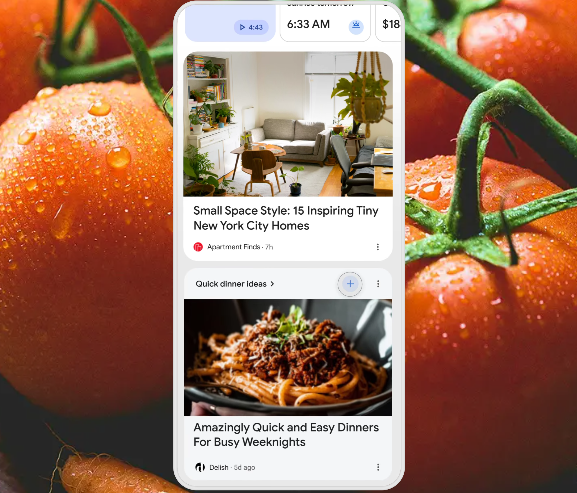
Google Discover is a highly personalized content feed on your mobile device that surfaces articles, videos, and news based on your inferred interests rather than explicit search queries. It lives right below the search bar in the Google app on iOS and Android.
When you use Google Maps to look up a restaurant, watch a travel vlog on YouTube, or search for a new piece of luggage, the algorithm takes notes. According to Google’s official Discover documentation, the system curates content by matching what it believes are your core interests with high-quality, relevant articles from across the web. For travelers, this means the feed transforms into a highly curated, real-time digital travel agent that learns your specific budget, preferred climates, and travel style.
My Experience: How Discover Built My Last 3 Itineraries
To understand the value of a personalized content feed, you have to see it in action. Here is exactly what the algorithm surfaced for me and how it solved my travel planning fatigue.
1. The Spontaneous Flash Sale (Oaxaca, Mexico)
The feed showed me an article titled, “Airlines Quietly Drop Fares to Mexico for the Next 48 Hours.” Because Discover knew I had recently searched for “best street food cities” and frequently read aviation news, it successfully connected the dots. I clicked the article, found a $199 round-trip flight from my home airport, and booked it immediately.
2. The Hyper-Niche Nature Escape (The Azores, Portugal)
I did not know the Azores existed until Discover showed me a photo essay about “Europe’s Secret Hawaii.” The algorithm recognized my heavy YouTube consumption of hiking documentaries and my previous Google Maps pins in remote coastal areas. The article provided a complete 5-day itinerary, which I saved directly to my browser and replicated almost exactly.
3. The Local Weekend Road Trip (The Super Bloom)
Instead of a long-haul flight, Discover served me a local news story about a rare wildflower super bloom happening just three hours from my house. It knew my exact location history and served a timely, hyper-local piece of content that I would never have thought to search for on a random Tuesday.
How Do I Customize My Google Discover Feed for Travel Ideas?
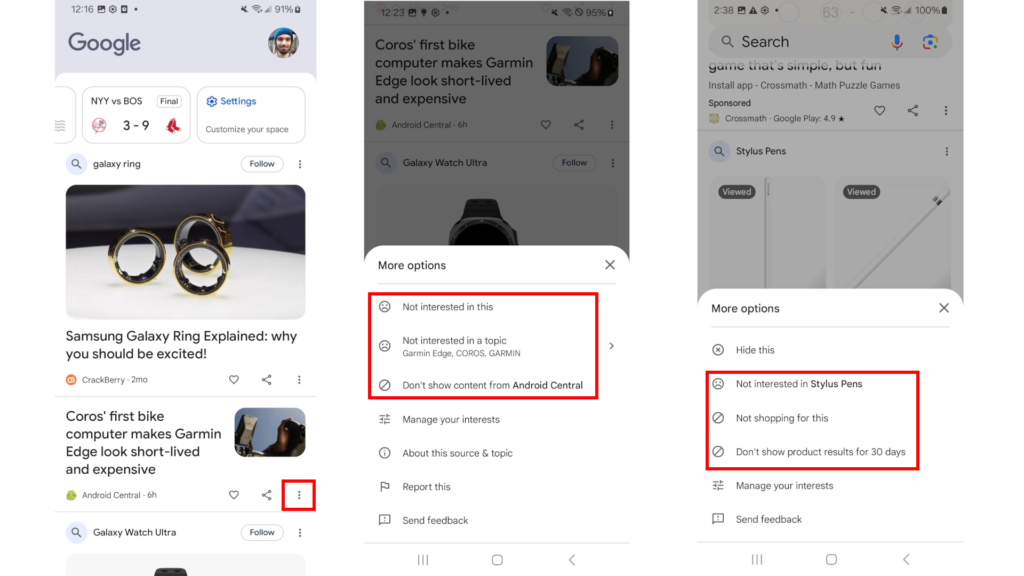
You must actively train the algorithm if you want it to feed you high-quality travel inspiration. If you do not interact with the feed, it will default to broad, generic news.
Follow these exact steps to curate your travel feed:
- Start with seed searches: Open Google and search for highly specific travel terms. Do not search “Europe travel.” Instead, search “boutique hotels in the Swiss Alps” or “best shoulder season travel deals.”
- Use the “Follow” button: When you search for a broad topic (like “Scuba Diving” or “Japan”), look for the “Follow” button that often appears at the top of the search results. Clicking this heavily weights your Discover feed toward that topic.
- Engage with the content: Click on high-quality travel articles when they appear. The algorithm tracks your click-through rate (CTR) and time spent on the page. If you read a whole article about budget travel in Asia, you will see more of it.
- Ruthlessly prune bad content: This is the most important step. When Discover shows you clickbait or a destination you hate, tap the three dots next to the article and select “Not interested in this topic” or “Don’t show content from [Publisher].”
The Action-Reaction Training Method
Here is a clear breakdown of how your actions directly change what travel content you receive:
| Your Action | Algorithm’s Reaction in Discover |
| Watching YouTube vlogs about Tokyo | Surfaces listicles about hidden Tokyo restaurants and Kyoto hotel reviews. |
| Tapping “Not interested” on cruise articles | Permanently removes all major cruise line news and heavy maritime travel content. |
| Saving places to Google Maps in Italy | Triggers hyper-local Italian news, flight routes to Rome, and regional travel guides. |
| Reading articles on airline points/miles | Prioritizes credit card optimization strategies and airline flash sale alerts. |
What to Do (and What Not to Do) When Booking Through Discover
While Discover is a massive timesaver, you still need to apply basic travel logic before entering your credit card information.
- Do verify publish dates. Discover sometimes resurfaces older, “evergreen” content if it thinks it matches your interests. An article about a “brand new” hotel might be two years old. Always check the date before assuming a specific deal or business is still active.
- Do use Google Flights to verify deals. If an article claims flights are cheap, immediately open a new tab and run the route through Google Flights to ensure the data is accurate for your specific travel dates.
- Do not fall for extreme clickbait. If a headline promises a “free luxury vacation,” it is likely a timeshare presentation or spam. Stick to authoritative publishers.
- Do not rely on Discover for visa or safety information. Use the feed for inspiration and itineraries, but always cross-reference entry requirements and safety alerts with official government travel portals.
By shifting your approach from actively searching to smartly curating, you let the internet bring the best corners of the world directly to your screen.

